Transactions calendar
The Transactions calendar lays out a month of transactions on a calendar, so you can see what happened, or will happen, on each day.
Open the calendar
- Go to Insights and tap Transactions calendar under Tools and analysis, or
- tap the Insights or Recent spending card in What's the big picture of my budget? or the Budget summary on your home screen.
Use the arrows next to the month name to move to the previous or next month.
Read the calendar
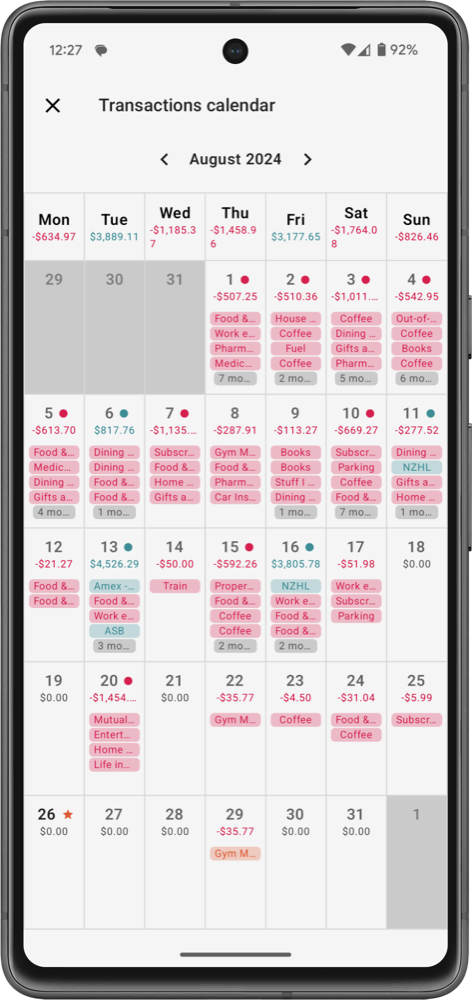
Each day shows:
- the day's total: money in minus money out, in green when positive and red when negative
- a chip for each transaction with its category: red for expenses, green for income, and amber for upcoming transactions that haven't happened yet. Projected repeats of your recurring transactions appear lighter. When a day has many transactions, the last chip says how many more there are.
- small markers for Above average spending* and Income received, and a marker on today
* A day counts as above average when its spending is higher than your average daily spending for the month. The note at the bottom of the calendar shows that average.
The row under the weekday names shows the total for each weekday across the month, which helps you see which days of the week you spend the most on.
Tap a day to see all its transactions, including upcoming and Projected ones.
The calendar starts the week on the day set in First day of week (More › Settings, under Language & Region). Use the bookmark button to bookmark it.
Free and Pro
On the Free plan you can open the days from 3 days before to 3 days after today; other days show a lock. Pro unlocks the whole calendar.