Projections
Projections answers one question: will I have enough money to cover all my expenses? Enter the income you expect, and the app adds up your targets to show whether you'll end the month with money to spare or a shortfall.
Projections is especially handy with Zero-Based Budgeting, where you only allocate money you actually have in your accounts. It lets you plan this month's targets around income that hasn't arrived yet, without allocating it early.
Open Projections
- Open the side menu and tap Projections (under Miscellaneous).
- Or open the Targets list and tap Will I have enough money to cover all my expenses?
Projections works from your targets, so if none of your categories has a target yet, the screen invites you to create one first with New target.
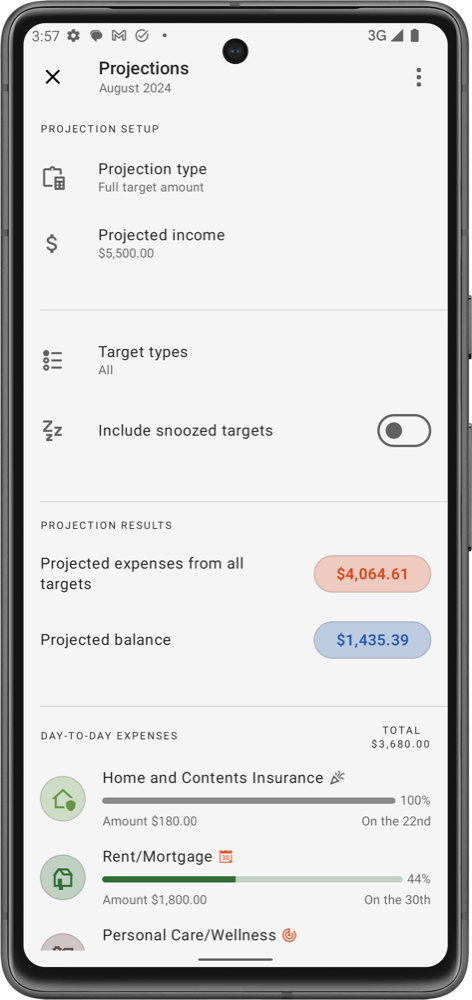
Projection setup
- Projection type: choose what counts for each target.
- Full target amount: uses the whole amount of every target.
- Target amount left: uses only the part of each target that still needs to be allocated.
- Projected income: the income you expect for the month. Tap it to enter the amount.
- Target types: which kinds of target to include: Day-to-day expenses, Get out of debt, Savings and On-going savings. The row shows All, None or how many types you've picked.
- Include snoozed targets: turn on to count targets you've snoozed this month.
The app saves your setup, so it's there the next time you open Projections.
Projection results
- Projected expenses from all targets: the total of the targets included in your setup.
- Projected balance: your projected income minus those expenses. A positive balance means your income covers every target with money left over; a negative one shows how much you're short.
Target breakdown
Below the results, the included targets are listed with their Total (or Remaining, with Target amount left). Use the sort and group buttons at the top to order them By priority, By amount or by Category name, and to group them by Target type or Category group.
- Tap a target to open its category.
- Swipe a target to the right to see the category's transactions, or to the left to snooze or unsnooze it for this month.
- Tap New target in the top menu to add a target without leaving the screen.
- Tap the bookmark icon to add Projections to your bookmarks.
Why it's useful
- Make sure the income you expect will cover everything you've planned for the month.
- Spot a shortfall early, while there's still time to adjust your targets, snooze one that can wait, or find extra income.
- See how much will be left after your targets, ready to put towards savings or debt.